Modern computers depend on fast storage just as much as they depend on powerful processors and sufficient memory. As software, games, creative workloads, and operating systems have become larger and more demanding, traditional storage technologies have struggled to keep pace. NVMe SSDs have become one of the most important upgrades in modern computing because they deliver dramatically faster data access than older hard drives and many earlier solid state drives.
TLDR: NVMe SSD stands for Non Volatile Memory Express Solid State Drive, a high speed storage device designed to use the fast PCIe interface instead of older SATA connections. It offers much faster read and write speeds, lower latency, and better performance for multitasking, gaming, creative work, and professional applications. Compared with traditional hard drives and SATA SSDs, NVMe SSDs can make systems boot faster, load files quicker, and handle large data transfers more efficiently.
What Is an NVMe SSD?
An NVMe SSD is a type of solid state storage device that uses the NVMe protocol to communicate with a computer through the PCIe interface. NVMe stands for Non Volatile Memory Express. The term “non volatile” means that the data remains stored even when the computer is turned off, while “express” refers to the fast, direct connection used to move data between the storage drive and the rest of the system.
Unlike a hard disk drive, which uses spinning magnetic platters and a mechanical read write head, an NVMe SSD stores data on NAND flash memory chips. Since there are no moving parts, an SSD can access data much more quickly and silently. NVMe technology takes this advantage even further by using a storage protocol designed specifically for flash memory rather than one originally built for mechanical drives.
In simple terms, an NVMe SSD is a fast, modern storage drive that allows a computer to open applications, transfer files, load games, and access data with much less delay.
How NVMe Differs from SATA SSDs
Before NVMe became common, many solid state drives used the SATA interface. SATA was originally created for traditional hard drives, and while SATA SSDs were much faster than hard drives, they were still limited by the older connection standard.
A typical SATA SSD may reach speeds of around 500 to 600 MB per second. In contrast, an NVMe SSD connected through PCIe can often reach several thousand MB per second. Modern PCIe Gen 4 and Gen 5 NVMe drives can deliver extremely high sequential read and write speeds, making them ideal for demanding tasks.
The difference is not only about peak speed. NVMe also offers lower latency, meaning it can respond to requests more quickly. It supports many more command queues and commands per queue than SATA, allowing the drive to handle multiple requests at the same time with greater efficiency. This matters in real world scenarios where a system is reading operating system files, opening applications, indexing data, and running background tasks simultaneously.
How NVMe Technology Works
NVMe technology works by allowing storage to communicate directly over PCIe lanes, the same high speed pathway used by graphics cards and other performance hardware. PCIe offers significantly more bandwidth than SATA, which gives NVMe SSDs the room to reach much higher speeds.
The NVMe protocol was designed from the ground up for flash storage. Traditional protocols such as AHCI were created in an era when hard drives were the standard, so they were not optimized for the parallel nature of SSDs. Flash memory can access many locations at once, and NVMe is built to take advantage of that capability.
- PCIe connection: Provides high bandwidth for fast data transfer.
- NAND flash memory: Stores data without moving parts.
- NVMe protocol: Manages communication efficiently between the drive and the system.
- Controller chip: Coordinates reading, writing, caching, and error correction.
This combination makes NVMe storage much faster and more responsive than older storage technologies.
Common NVMe SSD Form Factors
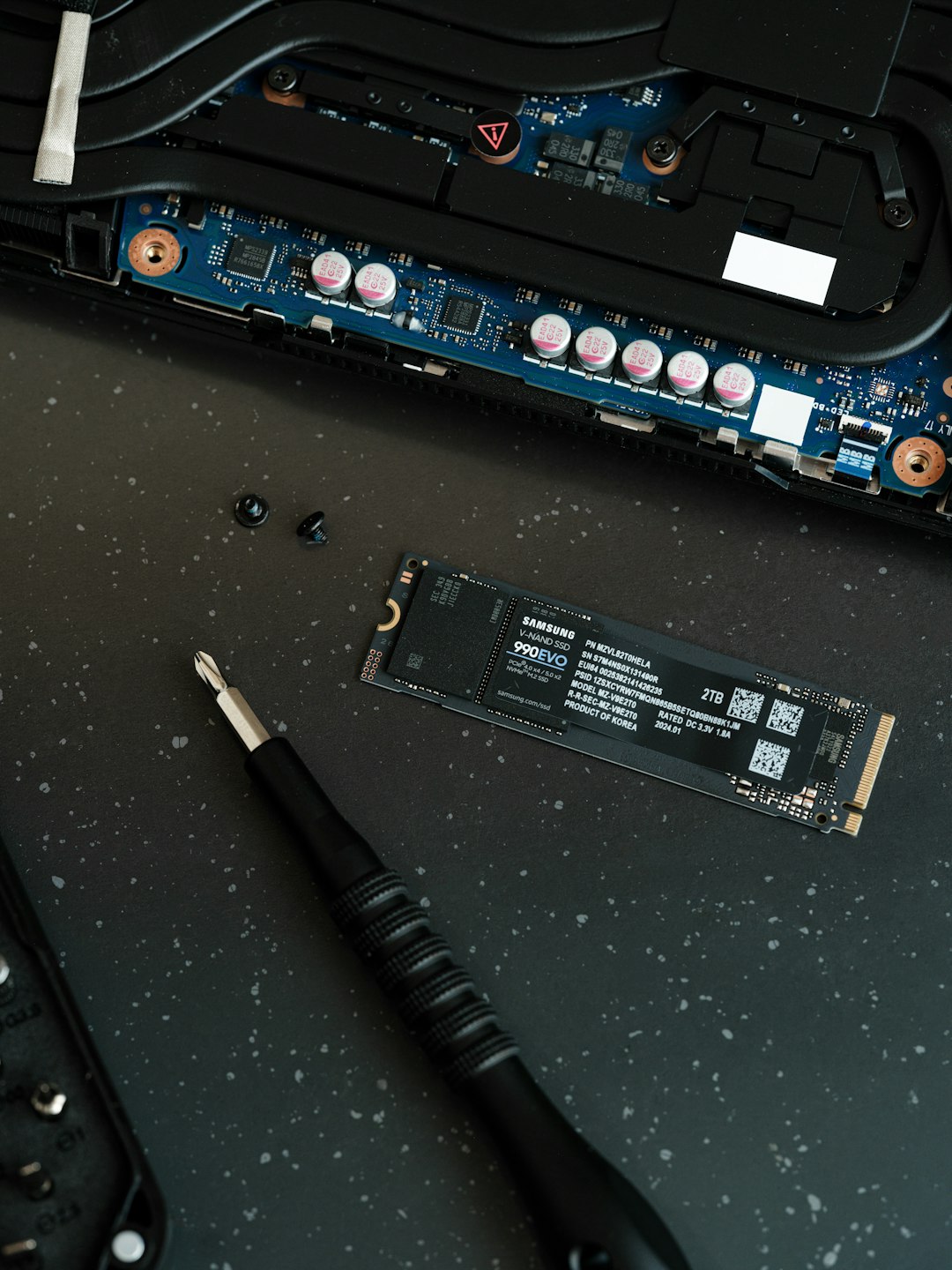
NVMe SSDs are available in different shapes and sizes, known as form factors. The most common consumer format is the M.2 drive, a slim stick like module that installs directly onto a motherboard. M.2 NVMe SSDs are widely used in desktops, laptops, mini PCs, and gaming systems because they are compact and require no separate data cable.
Another form factor is the U.2 drive, which is more common in servers and enterprise environments. Add in PCIe cards are also available, especially for workstations that require very high capacity or additional cooling. Although many people associate NVMe with M.2 drives, it is important to understand that M.2 is a physical shape, while NVMe is a storage protocol. Not every M.2 drive is NVMe; some M.2 drives still use SATA.
Benefits of NVMe SSDs
The main benefit of an NVMe SSD is speed, but its advantages extend beyond simple benchmark numbers. In everyday computing, faster storage can make the entire system feel more responsive.
- Faster boot times: Operating systems can start more quickly because system files are accessed at high speed.
- Quicker application launches: Programs open faster, especially large software suites and creative applications.
- Improved file transfers: Large videos, project folders, and archives can be moved or copied more efficiently.
- Better gaming experience: Games can load levels, textures, and assets faster, reducing waiting times.
- Smoother multitasking: Systems can handle background tasks and active workloads with less slowdown.
- Lower power consumption: Many NVMe SSDs are efficient, especially compared with mechanical drives.
- Quiet operation: Since there are no moving parts, NVMe SSDs operate silently.
For many users, upgrading from a hard drive to an NVMe SSD feels like replacing the entire computer. Even older systems can become noticeably more usable when storage bottlenecks are reduced.
NVMe SSD Performance: What the Numbers Mean
NVMe SSD specifications often include values such as sequential read speed, sequential write speed, random read and write performance, and IOPS. These numbers describe different aspects of performance.
Sequential speed refers to how quickly a drive can read or write large continuous files. This is important for tasks such as copying a large video file or working with high resolution media. Random performance describes how well the drive handles small files scattered across storage, which is important for operating system responsiveness and application loading.
IOPS, or input output operations per second, measures how many storage operations a drive can perform each second. Higher IOPS can help with multitasking, databases, virtualization, and professional workloads that require many small data requests.
However, real world performance is not always identical to advertised peak speeds. Factors such as motherboard support, PCIe generation, drive temperature, available free space, controller quality, and workload type can affect actual results.
PCIe Generations and NVMe Speed
NVMe SSDs rely on PCIe, and PCIe has evolved through several generations. Each generation increases available bandwidth. A PCIe Gen 3 NVMe SSD is still fast, but a PCIe Gen 4 drive can be much faster when installed in a compatible system. PCIe Gen 5 drives offer even higher speeds, though they may generate more heat and often cost more.
A system must support the same PCIe generation to get the full benefit of a newer drive. For example, a PCIe Gen 4 NVMe SSD may work in a PCIe Gen 3 slot, but it will usually run at Gen 3 speeds. This backward compatibility is useful, but buyers need to check motherboard and processor support before expecting maximum performance.
NVMe SSDs in Gaming
Gaming is one of the areas where NVMe SSDs receive significant attention. Fast storage can reduce loading screens, speed up game installation, and help open world games stream assets more efficiently. Modern game consoles and gaming PCs increasingly rely on NVMe storage because large game worlds need quick access to textures, maps, audio files, and other assets.
While an NVMe SSD may not always increase frame rates directly, it can improve the overall gaming experience by reducing waiting time and helping games feel smoother during loading heavy moments. Some newer technologies, such as direct storage features, are designed to take better advantage of fast NVMe drives in future games.

NVMe SSDs for Creative and Professional Work
Creative professionals often benefit greatly from NVMe storage. Video editors working with 4K, 6K, or 8K footage need fast read and write performance to preview, scrub, and export projects efficiently. Photographers handling large RAW image libraries can open and process files more quickly. Music producers, 3D artists, engineers, and software developers can also benefit from faster project loading and file access.
In professional environments, NVMe SSDs are commonly used for scratch disks, virtual machines, databases, and high speed cache storage. Enterprise grade NVMe drives may include advanced endurance ratings, power loss protection, and features designed for constant heavy workloads.
Potential Drawbacks of NVMe SSDs
Although NVMe SSDs offer major advantages, they are not perfect for every situation. One consideration is cost. While NVMe prices have fallen significantly, high capacity and premium models can still be more expensive than SATA SSDs or hard drives.
Another issue is heat. High performance NVMe drives can become warm during heavy transfers. Some drives require heatsinks to maintain stable performance and avoid thermal throttling, where the drive slows itself down to reduce temperature. Many motherboards now include M.2 heatsinks for this reason.
Capacity may also matter. Hard drives still offer large storage amounts at lower prices, making them useful for backups, media archives, and bulk storage. A common setup combines an NVMe SSD for the operating system and active applications with a larger hard drive or SATA SSD for long term storage.
How to Choose an NVMe SSD
Choosing an NVMe SSD depends on system compatibility, performance needs, capacity, and budget. The first step is to confirm that the computer has an available M.2 slot or compatible PCIe expansion option. It is also important to check whether the slot supports NVMe rather than only SATA.
- Capacity: 500 GB may be suitable for basic use, while 1 TB or 2 TB is better for gaming and creative work.
- PCIe generation: Gen 3 is affordable and fast, Gen 4 offers stronger performance, and Gen 5 targets high end systems.
- Endurance rating: Higher TBW ratings are useful for frequent large file writing.
- Cooling: A heatsink can help performance during sustained workloads.
- Warranty: Longer warranties often indicate better reliability and manufacturer confidence.
For everyday computing, even an entry level NVMe SSD can feel extremely fast. For demanding professional tasks, a higher performance model with strong sustained write speeds may be worth the investment.
Is an NVMe SSD Worth It?
For most modern systems, an NVMe SSD is absolutely worth considering. It provides one of the most noticeable performance improvements available, especially when replacing a hard drive. Faster startup times, improved responsiveness, and reduced loading delays make everyday computing more efficient and enjoyable.
Even compared with SATA SSDs, NVMe drives are often similarly priced in many capacities, making them the preferred choice when the system supports them. SATA SSDs still have a place in older computers and secondary storage roles, but NVMe has become the standard for high performance primary storage.
Conclusion
An NVMe SSD is a fast, efficient, and modern storage technology designed for the demands of today’s computers. By using the PCIe interface and a protocol built specifically for flash memory, NVMe delivers far better performance than older hard drives and SATA based storage. It improves boot times, application loading, file transfers, gaming, and professional workflows.
As software and data continue to grow, fast storage becomes increasingly important. NVMe SSDs have moved from premium hardware to mainstream computing, making them one of the most practical upgrades for desktops, laptops, and workstations.
FAQ
What does NVMe SSD mean?
NVMe SSD means Non Volatile Memory Express Solid State Drive. It is a fast storage device that uses flash memory and communicates through the PCIe interface.
Is NVMe faster than SATA SSD?
Yes. NVMe SSDs are usually much faster than SATA SSDs because they use PCIe bandwidth and a more efficient protocol designed for flash storage.
Is an NVMe SSD better than a hard drive?
For speed, responsiveness, silence, and durability, an NVMe SSD is much better than a hard drive. However, hard drives can still be useful for inexpensive bulk storage.
Can every computer use an NVMe SSD?
No. A computer must have a compatible M.2 slot or PCIe adapter support. The motherboard and processor must also support NVMe for proper operation.
Does an NVMe SSD improve gaming performance?
An NVMe SSD usually improves game loading times and asset streaming. It may not significantly increase frame rates, but it can make games load and respond faster.
Does an NVMe SSD need a heatsink?
Some high performance NVMe SSDs benefit from a heatsink, especially during long file transfers or heavy workloads. Basic drives may run fine without one if airflow is adequate.
What capacity NVMe SSD is best?
For general use, 500 GB to 1 TB is often enough. For gaming, creative projects, and large applications, 1 TB to 2 TB or more is usually a better choice.