Designing a website used to require a solid grasp of code, an eye for design, and plenty of patience. Today, page builder tools and services have transformed that process into something far more approachable. Whether you are a small business owner, freelancer, marketer, or hobbyist, modern page builders allow you to create polished, responsive websites with minimal technical knowledge. The best tools go beyond simple drag-and-drop functionality—they streamline layouts, improve workflow, and help turn ideas into live pages in record time.
TLDR: Page builder tools make creating beautiful, responsive websites faster and easier, even for non-developers. Platforms like Elementor, Divi, Wix, and Webflow offer intuitive design interfaces, customizable templates, and powerful layout controls. Each tool caters to slightly different needs, from beginner-friendly simplicity to advanced design flexibility. Choosing the right one depends on your experience level, budget, and project goals.
Below, we explore four of the top page builder tools and services that simplify website design and layouts while offering impressive creative freedom.
1. Elementor – Flexible and Feature-Rich for WordPress Users
Elementor has become one of the most popular page builders in the WordPress ecosystem—and for good reason. It combines an intuitive drag-and-drop interface with advanced design capabilities that appeal to both beginners and experienced developers.
Why Elementor stands out:
- Live front-end editing: Design your page in real time without switching between editor and preview modes.
- Extensive widget library: Add text blocks, sliders, forms, testimonials, pricing tables, and more.
- Responsive controls: Adjust layouts independently for desktop, tablet, and mobile views.
- Theme builder functionality: Customize headers, footers, product pages, and blog templates visually.
One of Elementor’s biggest strengths is its balance between ease of use and depth. Beginners can rely on pre-designed templates to launch a website quickly, while advanced users can fine-tune margins, padding, animations, and dynamic content.
For businesses running online stores, Elementor integrates smoothly with ecommerce plugins, enabling fully customized product pages and checkout layouts. Meanwhile, marketers benefit from built-in tools for landing pages and pop-ups.
Best for: WordPress users who want maximum design flexibility without touching code.
2. Divi – All-in-One Design Framework
Divi is more than just a page builder—it’s a comprehensive design framework. Known for its highly visual editing experience, Divi enables users to build sophisticated layouts using ready-made modules and design packs.
Key advantages of Divi:
- Visual builder with inline editing: Click directly on text and edit it on the page.
- Hundreds of layout packs: Professionally designed templates for different industries.
- Global design settings: Apply consistent styles across your entire website.
- Built-in split testing: Optimize layouts and content for better conversions.
Divi excels in consistency. Its global elements system allows you to define reusable styles and modules—meaning changes can be applied across multiple pages simultaneously. For branding consistency, that’s a major advantage.
Another standout capability is Divi’s design control. You can adjust spacing, shadows, hover effects, and animations easily. While it may feel overwhelming at first due to the sheer number of options, users often appreciate how much creative authority it grants.
Unlike some tools that charge per site, Divi offers membership-based access, making it appealing for freelancers and agencies creating websites for multiple clients.
Best for: Designers and agencies seeking advanced layout control and reusable design systems.
3. Wix – Beginner-Friendly Simplicity
If simplicity is your priority, Wix stands out as one of the most user-friendly website builders available. Unlike WordPress-based tools, Wix is an all-in-one hosted platform. That means hosting, security, and updates are handled for you.
The hallmark of Wix is its approachable, visual editing interface. Users can simply drag elements around the page and position them exactly where they want.
Why many beginners choose Wix:
- True drag-and-drop freedom: Place elements anywhere on the canvas.
- Large template library: Industry-specific templates ready to customize.
- Built-in business tools: Booking systems, ecommerce, event management, and more.
- No coding required: Designed specifically for non-technical users.
Wix also includes an AI-driven design assistant that can generate a basic website layout based on your answers to a few questions. This feature is ideal for users who feel overwhelmed by design decisions.
While Wix may not offer the same granular control as more advanced platforms, it excels in speed and convenience. For small businesses, personal brands, or portfolios, that simplicity can be a major advantage.
Best for: Beginners and small business owners who want an easy, all-in-one solution.
4. Webflow – Design Precision for Creative Professionals
Webflow bridges the gap between visual design and front-end development. It gives users powerful layout control while maintaining a visual interface—making it especially popular among designers who want pixel-perfect precision without manually coding everything.
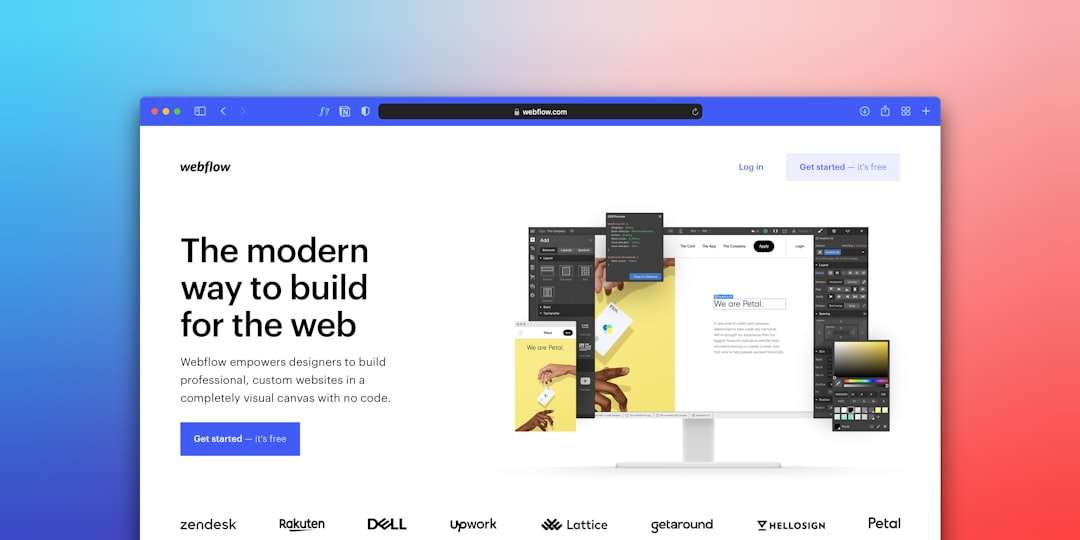
Top features of Webflow:
- Advanced layout systems: Full control over grid, flexbox, and positioning.
- Clean code output: Generates production-ready HTML, CSS, and JavaScript.
- Built-in CMS: Create dynamic content structures visually.
- Responsive design tools: Fine-tuned breakpoint customization.
Unlike more beginner-oriented tools, Webflow has a steeper learning curve. However, it rewards that effort by offering significantly greater control. Designers can manipulate classes, spacing systems, and interactions in ways that closely resemble writing CSS directly—without actually typing it.
Webflow also includes powerful animation and interaction tools. From subtle hover effects to complex scrolling animations, users can bring layouts to life without external plugins.
For startups and creative agencies, Webflow offers hosting and performance optimization built in. This eliminates the need for separate hosting management while ensuring professional-grade speed and reliability.
Best for: Designers and developers who want advanced customization with visual efficiency.
How to Choose the Right Page Builder
With several strong options available, selecting the right page builder depends on your needs. Consider the following factors:
- Experience level: Beginners may prefer hosted solutions with minimal setup. Advanced users may want deeper customization.
- Budget: Some tools operate on monthly subscriptions, while others offer lifetime licenses or tiered plans.
- Scalability: If you plan to expand your website significantly, choose a builder that supports dynamic content and ecommerce growth.
- Design flexibility: Decide whether pixel-perfect control or speed of deployment matters more.
It’s also important to test the interface of each tool. Most builders provide demos or free versions, allowing you to evaluate their workflow before committing.
The Future of Page Builders
Page builders continue to evolve at a rapid pace. Artificial intelligence is playing a larger role in layout suggestions, content generation, and responsive optimization. Automation features now help users maintain design consistency across large websites.
In addition, performance optimization has become a major focus. Modern page builders are working to produce cleaner code and faster-loading pages, addressing concerns about page speed and SEO.
Collaboration tools are also expanding. Teams can now work together on layouts, track revisions, and streamline approval processes more effectively than ever before.
Final Thoughts
Page builder tools and services have fundamentally simplified website design and layouts. What once required technical expertise can now be achieved through intuitive visual interfaces and smart templates. Whether you choose the flexibility of Elementor, the design system strength of Divi, the simplicity of Wix, or the precision of Webflow, each platform offers unique advantages.
The key is understanding your goals and matching them to the builder’s strengths. With the right tool in hand, you can move from concept to a fully functional, visually impressive website faster—and with far less frustration—than ever before.
Ultimately, page builders empower creativity. They lower the barrier to entry while still offering professional-grade capabilities, making modern web design more accessible and more powerful than at any time in the past.